






In the domain details you will find several views:
Under the domain name, if it is red The domain does not point to a server, you need to set the DNS records correctly (to the VMS server) in the DNS settings of the domain registrar.
List of several icons that redirect to specific services (Subdomains, DKIM, SSL, FTP, MySQL, Crony, WordPress)
Information – what server it is hosted on, whether it has SSL certificate, whether automatic https is set, default domain traffic (www / non-www) enable“multisite” traffic
Detail – here it is possible to download and view the list of access data (Mysql, FTP) , set categories
PHP settings – here you can change the php version and its parameters.
In the server details we find:
- Server IP address displayed
- SSL certificate whether it is set or not
- Automatic redirection to https , off / on
- Displays the set Aliases (set in Domains =>Aliases)
- Setting www rules (route to www / route to non-www / not set – handled by the web application)
- Ability to download and view domain accesses (FTP , MYSQL)
- You can set the domain expiration
- You can assign a domain to a category for a clearer view when you have multiple domains
- Add a note to your domain. (e.g., what kind of website)
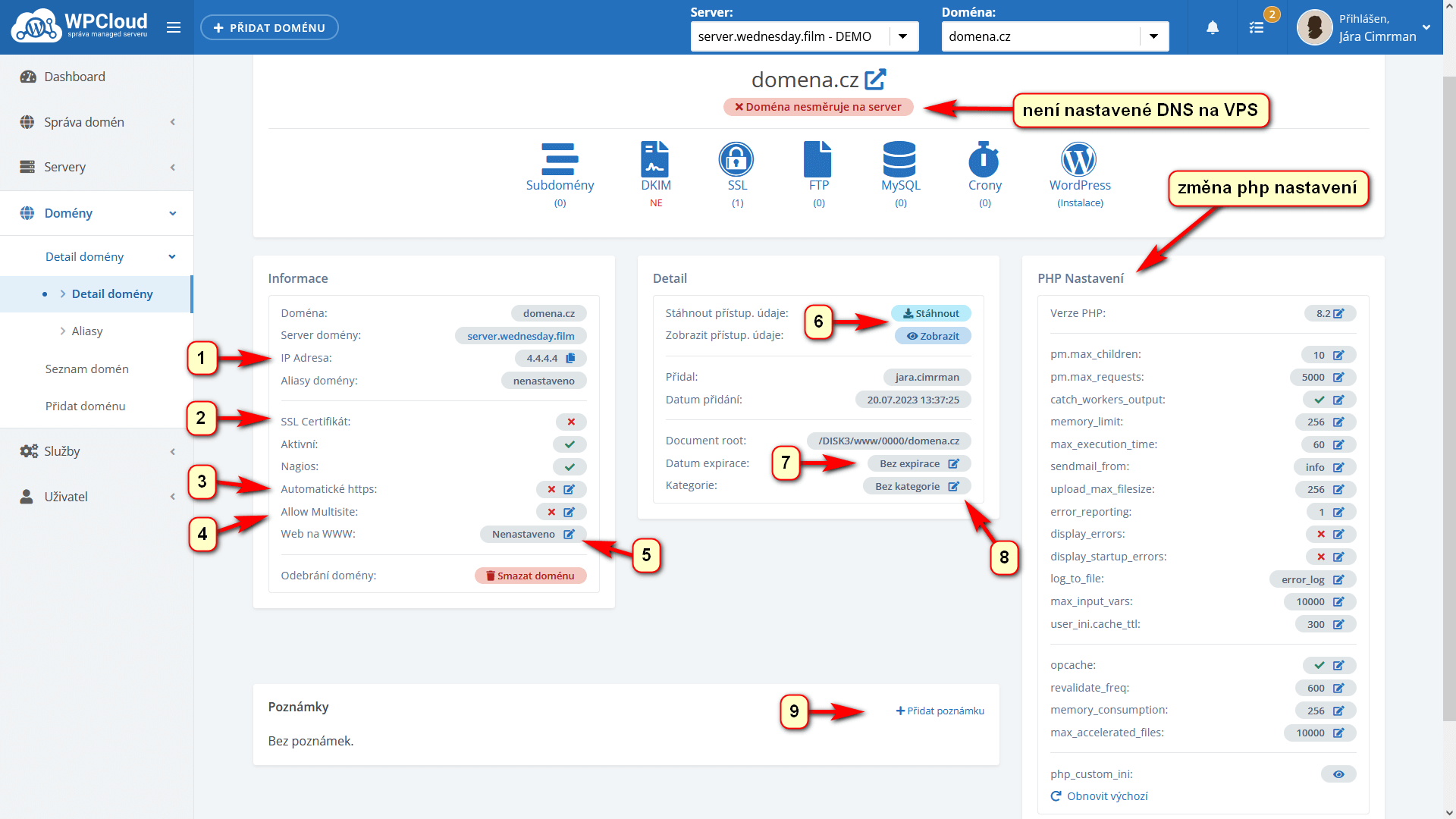
PHP Settings Highlights:
- pm.max_children: 10 – 40 (the number of PHP processes available to serve the PHP script)
- pm.max_requests: 5000 (the number of requests that can be processed by one process)
- catch_workers_output: yes ( catching errors in the server error log)
- memory_limit: 256 – 1024 (memory for php scripts)
- max_execution_time: 60 – 300 ( maximum script execution time)
- sendmail_from: info (email address of the sending email via the mail() function, info@vasedomena.cz)
- upload_max_filesize: 256 – 1024 (maximum value for upload)
- error_reporting: 8191 ( numeric setting of error reporting – see calculator)
- display_errors: no ( display errors see display error)
- display_startup_errors: no (display errors see display error)
- log_to_file: error_log (error logs either to an ftp file, or enable debug_log creation, or disable it altogether)
- max_input_vars: 10000
- opcache: Active (leave active for production site )
If you set the values incorrectly, you can Reset to Default. Only change values where you know their meaning.
It is necessary to take into account the overall HW parameters of the server, because if the settings are wrong, the server can overload or disable the hosting.
